It’s Tuesday afternoon.
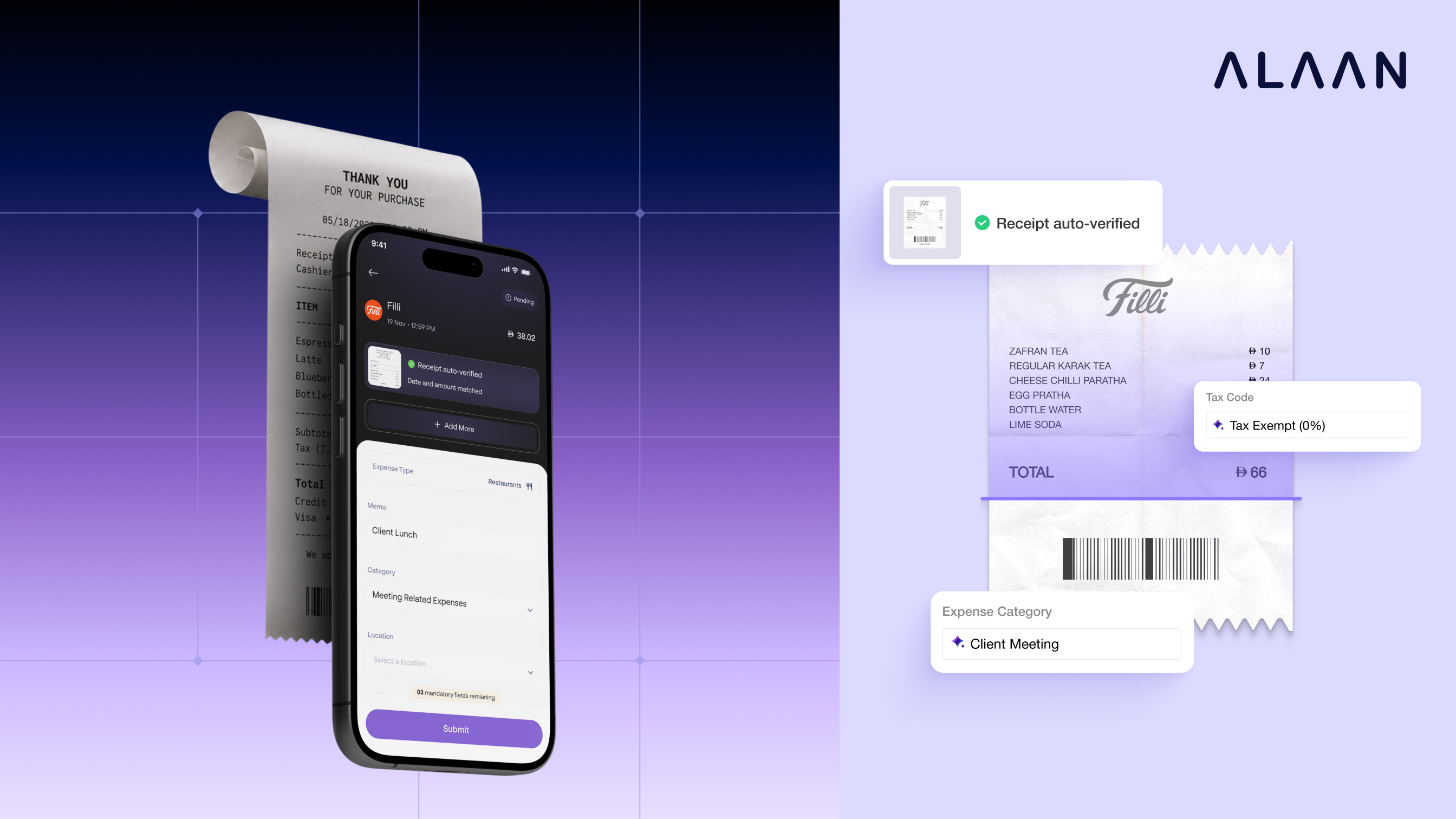
Sara, a sales manager in Dubai, has just finished a client lunch. She pays with her Alaan card, takes a photo of the receipt, and uploads it to Alaan’s WhatsApp.
About five seconds later, the receipt is attached.
She didn’t type in the amount, look up the transaction, or pick a merchant from a list.
That moment happens roughly 15,000 times a day on Alaan. It looks simple, but there’s a lot of engineering behind it.
Here’s how it works.
Why Matching Receipts Is Harder Than It Looks
On paper, the job sounds easy:
Read the receipt → find the matching transaction → link them.
Real receipts make it much harder.
- Photos can be blurry, crumpled, rotated, or badly lit.
- Some receipts are PDFs with several pages.
- The date on the receipt may not match the date recorded by the bank.
- A tip or currency conversion can change the final amount.
- One receipt can cover several transactions.
- Two lunches can cost almost exactly the same.
- Uploads arrive in bursts rather than at a steady rate.
So the challenge isn’t just reading receipts.
It’s reading them quickly and accurately, thousands of times a day, without mixing anything up.
Step 1: Save the Receipt and Reply Right Away
When Sara taps upload, we don’t make her wait for the entire processing pipeline to finish.
We do two quick things:
- Store the receipt securely.
- Put a message into a queue saying, “This receipt needs processing.”
Then the app responds immediately.
SQS sits between “someone just uploaded a receipt” and “a worker is free to process it.” Background workers pull messages from the queue and process many receipts at the same time.
A queue works like the ticket system at a busy service counter. Customers take a number, and the staff work through the tickets as quickly as they can.
This gives us a few important benefits:
- Uploads stay fast, even when many people upload at once.
- Heavy processing runs on dedicated workers in the background.
- If a worker crashes halfway through, SQS makes the message available again and another worker picks it up.
Because the file is already stored, a retry starts from the saved file. Sara never has to upload it again.
The user doesn’t need to wait for the backend to finish all the heavy work.
Step 2: Check the File Before Using AI
AI models are powerful, but they also cost time and money.
So before sending a receipt to an AI model, we run a few inexpensive checks:
- Is the file empty?
- Is the PDF damaged?
- Is the format supported?
- Does the image need to be converted first?
If a file can’t be read, we don’t keep retrying it indefinitely.
Instead, we mark it with a clear status so the user knows they need to upload a better copy.
It’s a small step, but it prevents a lot of wasted processing.
Step 3: Two AI Readers Race Each Other
A receipt can contain a lot of information:
- Merchant
- Date
- Total
- Currency
- Tax
- Line items
- And more
But when it comes to matching a receipt to a transaction, we usually need just two critical pieces of information:
The date and the total amount.
So we send the receipt to two AI readers at the same time.
The fast reader: Granite OCR
Granite OCR is asked for only four fields: date, currency, total amount, and merchant name. Because it extracts so little, it usually returns a result in one to two seconds.
The detailed reader
Our full extraction pipeline reads the whole document. It extracts tax details, line items, the document type, and more. It’s more thorough, so it takes longer.
Matching starts as soon as either reader returns a reliable date and amount.
The other reader continues working in the background.
- If Granite finishes first, the detailed result arrives a few seconds later and fills in everything Granite didn’t extract.
- If the detailed reader finishes first, it already has everything we need.
- If Granite fails, the detailed reader is already running, so there’s no delay while we try something else.
The result?
Sara gets her match quickly, while the full receipt information can continue arriving shortly afterward.
Step 4: Find the Right Transaction
Now we know what the receipt says.
The next question is: which transaction does this receipt belong to?
Every search is limited to Sara’s company and the people who could have made the purchase. This is an important data-isolation boundary, and it also gives the matching engine far fewer transactions to search through.
Our matching engine starts strict and loosens its rules one stage at a time:
- Strict match: the amount, date, currency, and cardholder all match exactly.
- Date relaxation: the amount matches, but the date is off in a realistic way. For example, the bank recorded the purchase a day later, the day and month were read in the wrong order, or the dates are within a week of each other.
- Partial match: the amount is close but the evidence is weaker, so we record it as a partial match instead of forcing a link.
- Split match: one receipt covers several transactions, such as a hotel bill paid with two charges.
- Already linked: someone linked the transaction manually while the receipt was still being processed, so we keep their link.
Here’s what that looks like in practice:
- Sara’s Filli receipt for 66 AED, dated 05/18/2026, matches in the strict stage, because the bank recorded the same amount on the same day.
- If the bank had recorded her charge a day later, the receipt would still match in the date-relaxation stage.
- A hotel receipt for 1,450 AED that was paid as two charges, 1,000 AED and 450 AED, matches in the split stage.
- If Sara had stopped at Filli again later that day and spent almost the same amount, the two receipts would never be swapped, because a strict match requires the exact amount.
The important part is that we don’t jump straight to loose rules. We only relax a condition after the stricter stage has failed.
Step 5: Cut Out the Waiting in Between
Individual matching steps used to be handed to separate workers through their own queues.
That kept the system organized, but every handoff added a little waiting. One handoff might only take a moment, but across several steps, those small delays added up.
Now, reading, matching, and saving the result happen as one continuous path inside the same worker. The steps are still separate in the code, but the receipt doesn’t wait in another queue between them.
We still use queues where they add the most value:
- Taking in new uploads
- Absorbing traffic spikes
- Retrying temporary failures
- Sending completed results to other parts of the product
The principle is simple: use queues at the edges, and keep the path the user is waiting on as short as possible.
Where the Five Seconds Go
Here’s a rough breakdown of Sara’s wait:
- Save the file and send the SQS message: under 300 milliseconds
- File checks: under 100 milliseconds
- Granite OCR returns the date and amount: about 1–2 seconds
- Matching and saving the link: about 200–500 milliseconds
- Total time until Sara sees the match: about 5 seconds
The detailed extraction finishes a few seconds later, after the match is already visible.
Plan for the Rush, Not the Average
Fifteen thousand receipts spread evenly across a day is less than one receipt per second.
But receipts don’t arrive evenly. Traffic spikes during:
- Working hours
- Business trips
- Month-end
- Expense submission periods
- Reminder campaigns
So we design the system for bursts rather than averages.
When a spike arrives, the SQS queue absorbs the sudden increase in traffic. Workers process receipts in parallel and catch up as quickly as possible. We also scale up the number of workers when demand is high.
The result is that a spike in receipt processing doesn’t slow down uploads for everyone.
When Things Go Wrong
A fast system also has to be reliable. Speed doesn’t matter if the system occasionally attaches a receipt to the wrong transaction.
So we have safeguards throughout the pipeline:
- If the fast reader fails or returns a poor result, the detailed reader is already running and takes over.
- If a receipt is difficult to read, we allow one controlled second attempt rather than retrying indefinitely.
- If two receipts try to claim the same transaction, database safeguards ensure only one valid link is saved.
- If a failure is temporary, SQS delivers the message again so the job can be retried.
- If a file can’t be processed, it receives a clear status instead of staying stuck.
- If additional processing is needed, work such as analytics or enrichment runs after the match and doesn’t hold it up.
The goal is to make the critical path both fast and predictable.
Measure What the User Actually Feels
It’s tempting to look only at how quickly an AI model responds. But that’s only one part of the journey.
Sara experiences the entire process:
Upload → Queue → Receipt Reading → Matching → Database Update → Result in the App
We measure each stage of that journey so we can see where time is actually spent:
- Is the AI model slow?
- Is the queue backed up?
- Is the database taking longer than expected?
- Is there a delay after matching?
Looking at the complete journey helps us improve the number that matters most: how long the user actually waits to see the receipt matched.
What We Learned
The five-second experience doesn’t come from simply finding a faster AI model. It comes from designing the entire journey around speed and reliability.
The key lessons were:
- Save uploads and respond immediately.
- Move heavy processing to background workers.
- Run a fast reader and a detailed reader in parallel.
- Start matching as soon as the key information is available.
- Start with strict matching rules and relax them one stage at a time.
- Remove unnecessary waiting between processing steps.
- Design for traffic spikes, not average traffic.
- Retry only when another attempt can actually help.
- Keep non-critical work away from the matching path.
- Measure the complete user journey, not just individual services.
The AI reads the receipt, but the system around it is what makes the experience fast, reliable, and useful at scale.
That’s what turns a simple “upload receipt” button into a system that matches thousands of receipts every day.
I’m an AI Developer at Alaan, working on AI-based products and solutions. I enjoy taking ideas from experimentation to production and building things that are useful and reliable.

I build AI products at Alaan, where machine learning, backend systems, and customer experience meet. I like taking ambitious ideas from experiment to production and turning them into reliable, high-impact systems.